Cloudflare One
Simplifying Multi-Factor Authentication
Designing a clearer, more predictable MFA configuration experience for Zero Trust administrators.
Role
Product Designer
(UX, UI, Research, Prototyping)

01
THE CHALLENGE
Complex settings made MFA difficult to manage
Administrators needed to configure MFA across multiple levels of the Zero Trust platform. However, the relationship between global enforcement, supported authentication methods, and application or policy overrides created a complex decision-making process.
Critical pain points
•
Unclear hierarchy
It wasn't obvious how global, application, and policy settings interacted.
•
Too many conditional controls
Admins had to navigate multiple screens and redundant options to achieve common tasks.
•
Risk of misconfiguration
It was easy to create unintended security gaps.
02
DISCOVERY & INSIGHTS
Understanding admin workflows
I conducted user research, stakeholder interviews, and an audit of the existing experience to identify where admins struggled and what they needed to feel confident managing MFA.

Key insights
1
Clarify configuration hierarchy
Make the relationship between global, application, and policy settings easier to understand.
2
Separate enablement from enforcement
Distinguish turning MFA on from requiring global settings across the organization.
3
Reduce decision complexity
Eliminate redundant controls when a simpler toggle can communicate the intended behavior.
4
Improve configuration visibility
Make supported MFA methods and their associated settings easier to review and manage.
5
Prevent unintended security gaps
Communicate the implications of overrides, bypasses, and method removal.
03
AI-AUGMENTED DESIGN
Using AI as a research & design partner
I used ai to accelarate analysis, exploration, and iteration. AI helped me work faster and broader - but it didn't replace user research, domain expertise, or security decision-making.
Research evidence
User interviews, support themes, product analytics, and existing UX audit.
AI-assisted synthesis
Clustered pain points, generated edge cases, explained flow options, and drafted content.
Designer judgement
Validated findings against source evidence, applied domain expertise, and refined the direction.
04
DESIGN STRATEGY
A simpler, more predictable model.
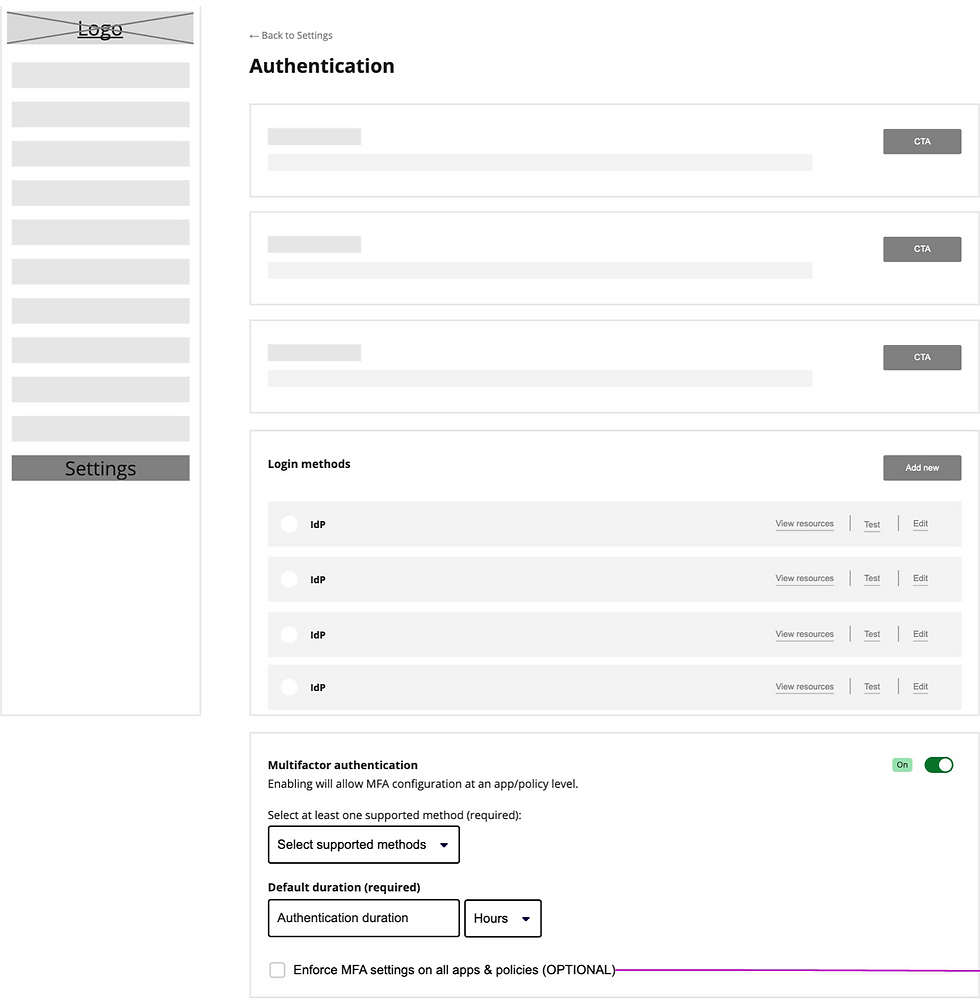
I explored a configuration model built around three principles to reduce complexity and make high-impact decisions clearer:
1
Make the hierarchy explicit
Establish global MFA settings as the baseline, with application and policy configurations taking precedence where overrides are permitted.
2
Simplify conditional controls
When global MFA is enabled but not enforced, use a straightforward app- or policy-level toggle to enable MFA and reveal custom settings only when needed.
3
Make decisions understandable
Introduce contextual guidance and confirmation steps to explain the impact of global enforcement, supported methods, and configuration changes.
Design exploration
05
Proposed solution
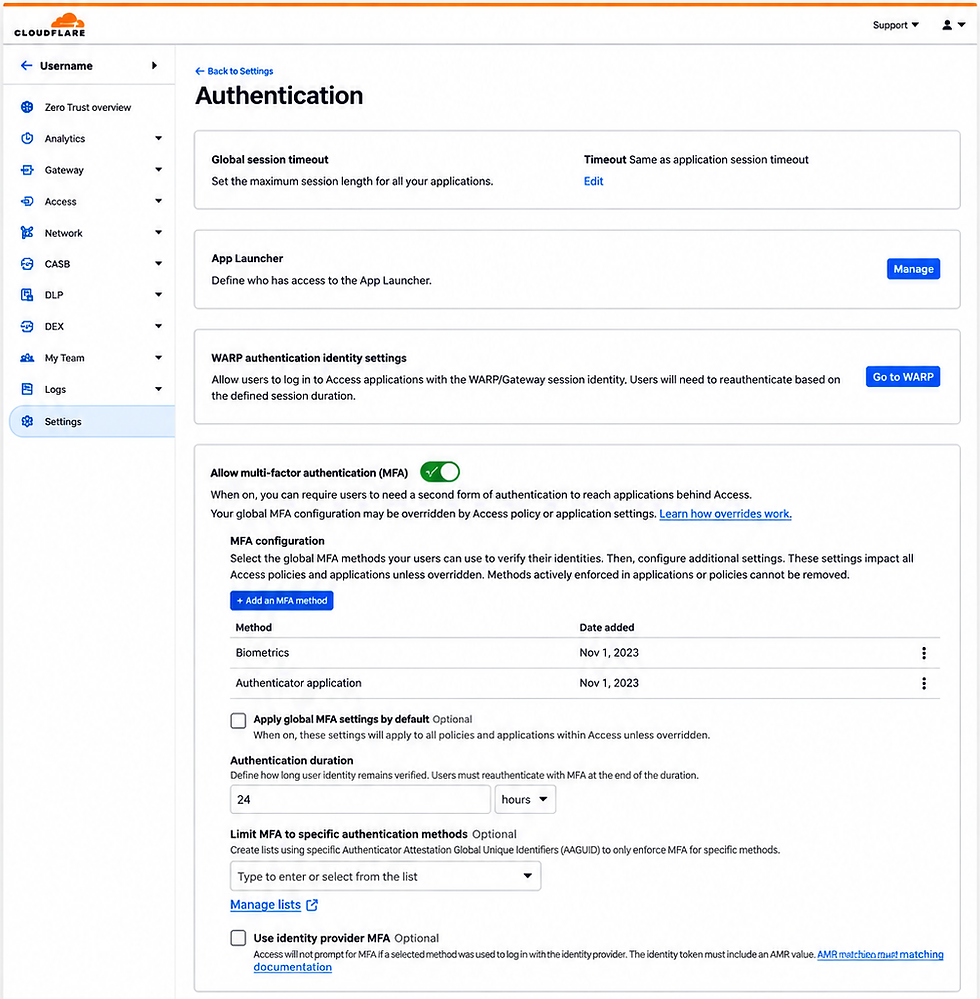
A clearer more intuitive MFA configuration experience
The new design centralizes global MFA settings, provides progressive disclosure for advanced options, and clearly communicates how application & policy overrides work.
Key insights
1
Global MFA controls
Centralize supported authentication methods, authentication duration, and advanced configuration options.
2
Progressive disclosure
Reveal additional settings only when relevant, reducing unnecessary visual and cognitive complexity.
3
Clear override behavior
When global enforcement is active, make the available choices explicit: inherit global settings, customize MFA, or bypass it where permitted.
4
Safer configuration management
Provide contextual explanations and confirmation before consequential actions, such as enforcing global settings or removing an authentication method.

06
Key interaction examples
Important flows, simplified
Key interactions were designed to improve clarity, reduce errors, and give admins confidence in their configuration

Add a new MFA method
A streamlined flow to add and manage supported authentication methods.

Confirm before removal
Clear explanation of the impact before taking action.

Advanced settings
Additional options are revealed only when needed.
07
Validation & expected impact
Measuring success
The proposed design should be evaluated through usability testing and behavioral metrics to ensure it helps IT admins configure MFA more effectively and with greater confidence.
Task completion
Can administrators configure the intended MFA behavior independently?
Comprehension
Can administrators correctly identify which settings apply to a policy or application?
Efficiency
Does configuration take less time and require fewer steps?
Confidence
Do administrators trust that their configuration enforces the intended security requirements?
Accuracy
Are configuration errors and unintended bypasses reduced?